Google Block Breaker: How to Play, Controls, Tips, and Game Features
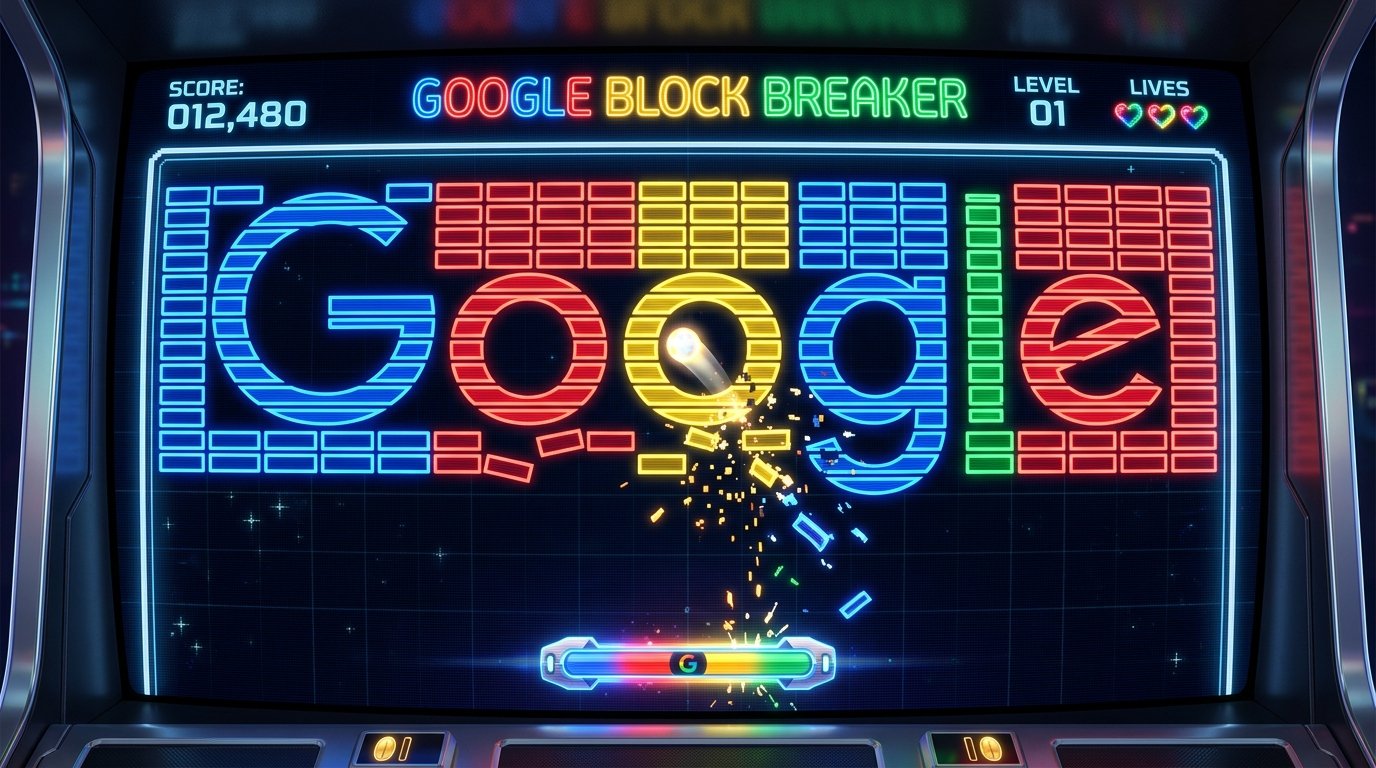
Google Block Breaker is a brick-breaking arcade game that challenges players to bounce a ball off a paddle and clear blocks from the screen. The goal is simple: keep the ball in play, break as many blocks as possible, and avoid letting the ball fall past your paddle. If you enjoy classic arcade games, quick challenges, and games that test your timing, Google Block Breaker is an easy game to pick up and a fun one to practice.
The game follows the same basic idea as classic brick-breaker games. You control a paddle near the bottom of the screen, move it to catch the ball, and guide the ball toward blocks above. Each successful hit can remove a block, while a missed ball may cost you a life or end your run, depending on the version you are playing.
Although the controls are easy to learn, getting a high score takes practice. You need to watch the ball’s direction, predict where it will land, choose useful angles, and stay calm when the screen becomes crowded with moving objects.
This guide explains how to play Google Block Breaker, understand its controls, improve your performance, deal with common problems, and decide whether the game is right for you.
What Is Google Block Breaker?
Google Block Breaker is a browser-based arcade game that Google added to its Search experience in January 2025, according to technology reporting published at the time. It draws on the classic Breakout style of gameplay, in which a player uses a paddle and bouncing ball to destroy a wall of blocks.
9to5Google
+1
The game combines a simple goal with a challenge that grows as you play. You do not need to learn a long list of commands or understand complicated game rules. You mainly need to control the paddle, follow the ball, and make good decisions about where to send it.
The main parts of the game are:
- Paddle: The horizontal bar you move near the bottom of the playing area.
- Ball: The moving object that hits the blocks and bounces around the screen.
- Blocks: The targets you must hit to clear the playing field.
- Score: The points you earn as you break blocks.
- Lives: The chances you have to continue after missing the ball.
- Power-ups: Special bonuses that may provide extra help during a round.
The exact features and controls can depend on the version available to you. Independent Block Breaker websites and mobile apps may use similar names but offer different levels, bonuses, and rules. For that reason, it is worth checking whether you are playing Google’s Search game or a separate game made by another developer.
How to Play Google Block Breaker
Getting started is straightforward. If Google’s interactive game card is available in your region and on your device, you can launch it from Search rather than installing a separate game.
Step 1: Open Google Search
Open a web browser on your computer, phone, or tablet. Go to Google Search and enter one of these phrases:
- Google Block Breaker
- Block Breaker
- Brick Breaker
Look through the results for the interactive game card. If it appears, select the play option to open the game.
Searching for the game does not guarantee that the card will appear every time. Search features can vary by device, location, language, and availability. If you see only ordinary websites, try another search phrase or check again using a different browser.
Step 2: Start the game
Once the game opens, take a moment to look at the playing area. You should be able to identify the paddle, the ball, the blocks, and the score display.
Follow the instructions shown in the game to begin. Depending on the version, the ball may start moving automatically or wait for an initial click or tap.
Avoid moving the paddle too quickly at first. Your first goal is to learn how the controls respond.
Step 3: Move the paddle
Your paddle moves horizontally along the bottom of the screen. Move it underneath the ball before the ball reaches the bottom edge.
On a computer, the available controls may include the mouse or keyboard arrow keys. On a touchscreen, you may be able to move the paddle by dragging your finger or tapping the screen. Use the instructions displayed by the version you opened rather than assuming every version has identical controls.
Step 4: Hit the blocks
When the ball touches a breakable block, the block may disappear or take damage. The ball then changes direction and continues moving.
Your task is to keep the ball in play while hitting as many blocks as possible. Try to aim for open spaces in the block formation, where the ball can bounce around and strike several targets before returning to the paddle.
Step 5: Keep playing and watch your lives
If you fail to catch the ball, you may lose a life. The game can end when you run out of lives, although the precise rules depend on the version.
Watch the score and any life counter throughout the round. If the game offers a restart or replay option, you can use it to practice and improve your result.
Google Block Breaker Controls Explained
Good control is more important than fast reactions alone. Moving the paddle at the right time helps you keep the ball in play, while learning how the ball responds to contact can help you target blocks more effectively.
| Control method | How it works |
|---|---|
| Mouse | Move the paddle horizontally if mouse control is supported. |
| Keyboard | Use the left and right arrow keys if the game supports them. |
| Touchscreen | Drag or tap to control the paddle, depending on the version. |
| Start or launch action | Follow the on-screen prompt to begin a round or release the ball. |
| Sound control | Use the game’s sound icon if one is available. |
How to control the game on a PC
A desktop or laptop gives you more than one possible way to control the paddle. If the game responds to the mouse, move it left or right to follow the ball. If keyboard controls are available, use the arrow keys for direct movement.
Choose the method that lets you react comfortably. Some players prefer a mouse because it follows their hand movement, while others prefer the keyboard because its directions are clear and predictable.
Keep the game window large enough to see the ball clearly. If the ball becomes difficult to follow, reduce distractions and focus on its position rather than looking only at the blocks.
How to play on a phone or tablet
A touchscreen makes the game easy to access without a keyboard. Open Google Search in your mobile browser, find the game card if it is available, and follow its touch instructions.
Use short, controlled movements when positioning the paddle. Large, sudden swipes can make it harder to line up with the ball, especially when it moves quickly.
If the paddle does not respond, check whether your finger is interacting with the game area itself. Also make sure the browser page has finished loading and that no menu or pop-up is covering the game.
Best Tips to Get a Higher Score in Google Block Breaker
A high score comes from keeping the ball in play and making each bounce count. You do not need perfect reactions. A few simple habits can help you last longer and clear blocks more efficiently.
1. Follow the ball, not just the paddle
New players often move the paddle from side to side without thinking about where the ball will land. A better approach is to watch the ball’s path and move the paddle toward its expected landing point.
Pay attention to whether the ball is moving toward the left or right side of the screen. This gives you more time to prepare for the next bounce.
2. Learn how bounce angles work
The point where the ball hits the paddle can affect its direction in many brick-breaker games. A hit near the center often sends the ball back at a more direct angle, while a hit closer to an edge may send it sideways.
Use this behavior to your advantage when the game supports angled rebounds. Aiming the ball toward a less crowded section of blocks may help you break more targets before it returns.
Do not assume the ball will always follow the same path. Watch each bounce and adjust your next move.
3. Aim for gaps in the block formation
Hitting the nearest block is not always the best strategy. Sometimes, sending the ball through an opening near the edge or between blocks allows it to travel behind the main formation.
Once the ball gets behind a group of blocks, it may hit several targets in succession. This can clear a large area without requiring you to aim at every block individually.
Look for openings rather than trying to hit the middle of the wall every time.
4. Keep the paddle in a useful position
Avoid moving the paddle to the far edge unless the ball is heading there. Returning it toward a central position can make it easier to respond when the ball changes direction.
This does not mean you should keep the paddle in the middle at all times. The ball’s path should guide your movement. The goal is to avoid unnecessary travel that leaves you out of position.
5. Collect power-ups when it is safe
Some versions of Block Breaker include bonuses that improve your chances of clearing blocks or surviving longer. These may include extra balls, a wider paddle, or other special effects.
If a bonus falls from a broken block, decide whether it is safe to move toward it. Do not chase a bonus so far that you lose track of the main ball.
The value of a power-up depends on the version and the situation. A wider paddle may help when the ball is moving quickly, while additional balls may cover more of the block formation.
6. Stay calm when the ball speeds up
As the game progresses, faster movement can make it harder to predict the ball’s landing point. Instead of making repeated, sudden movements, focus on the direction of travel and move early.
If you lose a life, treat the next attempt as a chance to learn. Notice which part of the screen caused trouble and adjust your strategy rather than repeating the same movement.
7. Use short practice sessions
You can improve by focusing on one skill at a time.
For example, spend one round tracking the ball carefully. In the next, pay attention to bounce angles. Then try to find openings in the blocks instead of aiming at the nearest target.
This approach makes it easier to notice what works. It also helps you improve without turning a casual arcade game into a frustrating task.
Understanding Blocks, Scores, and Power-Ups
The colorful blocks are the main targets, but their behavior may vary between games. In Google’s Search version, reports describe colored blocks and special features, including bonuses that can affect gameplay. However, you should not assume every color has the same meaning across all versions.
9to5Google
+1
Do different blocks need different numbers of hits?
Some brick-breaker games use blocks that disappear after one hit, while others require several hits. Certain blocks may also be unbreakable or behave differently.
Look at what happens when you hit each type of block. If a block remains on the screen after a collision, it may need another hit or have a special rule.
Learning these patterns can help you decide where to aim and which areas are worth clearing first.
How does scoring work?
Your score generally increases when you break blocks, but the number of points awarded can vary. Some games give extra points for harder targets, consecutive hits, or special events.
If the game displays a score counter, use it to track your progress between rounds. Avoid relying on scoring systems described for unrelated Block Breaker games, because their point values may not apply to Google’s version.
What do power-ups do?
A power-up is a temporary or lasting bonus that changes the normal rules of a game. In brick-breaker games, common examples include a larger paddle, multiple balls, or an extra life.
The effect depends on the specific game. Some bonuses make it easier to catch the ball, while others help destroy blocks more quickly.
Read any on-screen instructions when a special item appears. That is the best way to understand its effect without confusing features from a third-party version with Google’s game.
Google Block Breaker vs. Classic Atari Breakout
Google Block Breaker belongs to the same broad family of games as Atari’s Breakout, which introduced the paddle-and-ball brick-breaking format in 1976. The core challenge is similar: control a paddle, bounce a ball toward blocks, and keep the ball from escaping past you.
Pocket-lint
The main difference is how players access and experience the game.
Google Block Breaker
This version is presented as an interactive game within Google Search when available. Its colorful design and reported special gameplay features give the classic formula a modern look.
Classic Atari Breakout
The original arcade game is the historical source of the familiar paddle-and-ball concept. It is best known for its simple controls and focus on clearing rows of bricks.
Both are easy to understand without a tutorial, but neither is simply a test of speed. Positioning, timing, and predicting rebounds are central to the experience.
It is also important to distinguish Google’s current Search game from the older Atari Breakout Easter egg associated with Google Images. The two are related in concept, but they are not the same implementation.
Is Google Block Breaker Free?
Google’s Search game has been reported as a free-to-play experience accessible from the search results, without requiring a separate game installation.
9to5Google
+1
If the interactive game card appears, you can generally start by selecting its play option. You do not need to look for a paid version simply to try the Search experience.
However, not every game using the name Block Breaker is Google’s version. Independent websites and mobile apps may have their own payment options, advertisements, extra features, or download requirements.
Before installing anything, check the developer name, requested permissions, and any listed costs. If your goal is simply to play a quick arcade game, an available Search game card may be enough.
Does Google Block Breaker Work on Mobile?
The game has been reported as playable on mobile devices as well as desktop computers.
9to5Google
+1
The exact experience may depend on your browser, screen size, and whether the game is available in your region.
On a phone, the smaller screen can make fast-moving balls harder to follow. Try holding your device comfortably and using controlled finger movements rather than swiping across the screen too quickly.
On a tablet, the larger display may make it easier to track the ball’s direction. On a computer, a mouse or supported keyboard controls may offer a more familiar way to position the paddle.
If the game does not appear on your device, that does not automatically mean your device is incompatible. Search features can change, and a third-party result may appear instead of the intended interactive game.
Is Google Block Breaker Safe to Play?
The key distinction is between the game shown directly inside Google Search and a separate website or app that uses a similar name.
If you open a third-party game, review its page before downloading files, granting permissions, or entering personal details. A game does not need your password or payment information merely for you to move a paddle and break blocks.
For younger players, parents can also check the device’s browser settings and general content restrictions. Keep in mind that restrictions designed for app downloads do not necessarily hide every game or interactive feature that appears in Search. Google’s own help guidance makes this distinction for Play Store content restrictions.
Google Play Help
+1
Basic precautions are enough for most casual gaming situations:
- Use the Search game card when it is available and clearly identified.
- Avoid downloading unfamiliar files just to play a simple arcade game.
- Do not enter personal information into an unrelated game page without a clear reason.
- Check whether a third-party game includes advertisements, purchases, or additional permissions.
These checks help you understand what you are opening without assuming that every game with a familiar name is operated by Google.
Common Google Block Breaker Problems and How to Fix Them
Sometimes, searching for Google Block Breaker does not produce the expected game. Other times, the game appears but does not respond as expected. Try these simple checks before giving up.
The game does not appear in Google Search
Search for “Google Block Breaker” or “Block Breaker” using the main Google Search page. Look carefully through the results for an interactive game card.
If it is missing, try refreshing the page or using another browser. You can also check whether a browser extension is blocking page content.
The game may not be available in every search environment, so there may not be a setting you can change to make it appear.
The game loads but does not start
Wait for the page to finish loading and follow the displayed start instructions. If the game remains unresponsive, refresh the page and try again.
You can also close extra tabs if your browser is running slowly. If you use content-blocking extensions, check whether they interfere with interactive elements on the page.
The paddle will not move
First, check the control instructions shown by the game. Try the mouse or arrow keys on a computer, or touch gestures on a phone if those controls are supported.
Make sure the game has focus and that no menu is covering the playing area. On a touchscreen, avoid dragging from outside the game frame if the browser is interpreting your movement as page scrolling.
The game feels slow or keeps freezing
A weak connection, an overloaded browser, or a device running many tasks at once can affect how a browser game performs.
Try closing unnecessary tabs, refreshing the game, and updating your browser if an update is available. If the problem continues, test another browser or device to help narrow down the cause.
The game appears to be a different version
Check whether you are still inside Google Search or have opened a separate website. Third-party games can use the same name while offering different graphics, controls, lives, and scoring systems.
If the game has a different layout from the one you expected, read its instructions before applying tips meant for another version.
Who Should Play Google Block Breaker?
Google Block Breaker is a good fit for people who enjoy short arcade challenges without needing to learn complicated controls. It can also suit players who remember classic brick-breaking games and want a similar experience in a modern search environment.
It may appeal to:
- Casual players who want a quick game during a break.
- Retro gaming fans who enjoy simple arcade mechanics.
- Beginners looking for an easy game to learn.
- Puzzle and timing enthusiasts who like predicting movement and planning their next action.
- Mobile users who prefer games that can be played through a browser when available.
It may be less appealing to players who want a long story, detailed character development, multiplayer competition, or a deep progression system. The main attraction is the straightforward gameplay, not a complex world or lengthy campaign.
As with any game, it is worth taking breaks if you find yourself playing longer than intended. A few short rounds can be entertaining without needing to turn a casual pastime into a long session.
Frequently Asked Questions
How do I play Google Block Breaker?
Search for “Google Block Breaker” or “Block Breaker” on Google. If the interactive game card appears, select its play option. Move the paddle to bounce the ball toward the blocks, and try to keep the ball from falling past the paddle.
Is Google Block Breaker an official Google game?
Technology publications reported in January 2025 that Google had added a Block Breaker game to Search. However, separate websites and apps also use the Block Breaker name, so check where the game opens before assuming it is Google’s version.
9to5Google
+1
Can I play Google Block Breaker without downloading anything?
If the Google Search game card is available, you can play through the browser without installing a separate game app. A third-party version may have different requirements.
Why can’t I find Google Block Breaker?
The interactive game may not appear in every search environment. Try a different search phrase, refresh the page, or use another browser. If it still does not appear, the feature may not be available in your current setup.
What is the best strategy for Google Block Breaker?
Track the ball, move the paddle before the ball reaches the bottom, and look for gaps that let the ball travel behind the blocks. Practice controlling rebound angles and collect power-ups when doing so is safe.
Is Google Block Breaker the same as Atari Breakout?
No. They share the same basic paddle-and-ball gameplay, but Google’s Search game is a separate implementation inspired by the classic brick-breaking format. The older Atari Breakout game was released in 1976.
Pocket-lint
Conclusion
Google Block Breaker offers a simple way to enjoy classic arcade gameplay through Google Search when the interactive feature is available. You control a paddle, bounce a ball toward colorful blocks, and try to keep the game going as the challenge increases.
To get better, focus on predicting where the ball will land, making controlled movements, learning how rebounds work, and looking for openings in the block formation. If the game does not appear, check your browser and search settings before assuming you need to install another version.
The appeal of Google Block Breaker is its simplicity: a few basic controls, a clear goal, and plenty of room to improve with practice.